Models
Route: Settings → Models (/settings/models)
Register the AI models your organization uses, and bind each to a credential from the Vault. Registered models are what OpenGround offers for comparison and what LLM-based Guardrails use as their judge.

What registered models are for
| Consumer | How it uses a registered model |
|---|---|
| OpenGround | Populates the provider/model choices you can compare |
| Guardrails | LLM-based detection needs a judge model with working credentials |
Models you call from your own application do not need to be registered. Your app uses its own provider client; TrailAI observes it through instrumentation. Registration is only for the features where TrailAI makes the call.
Adding a model
Click Add New Model.
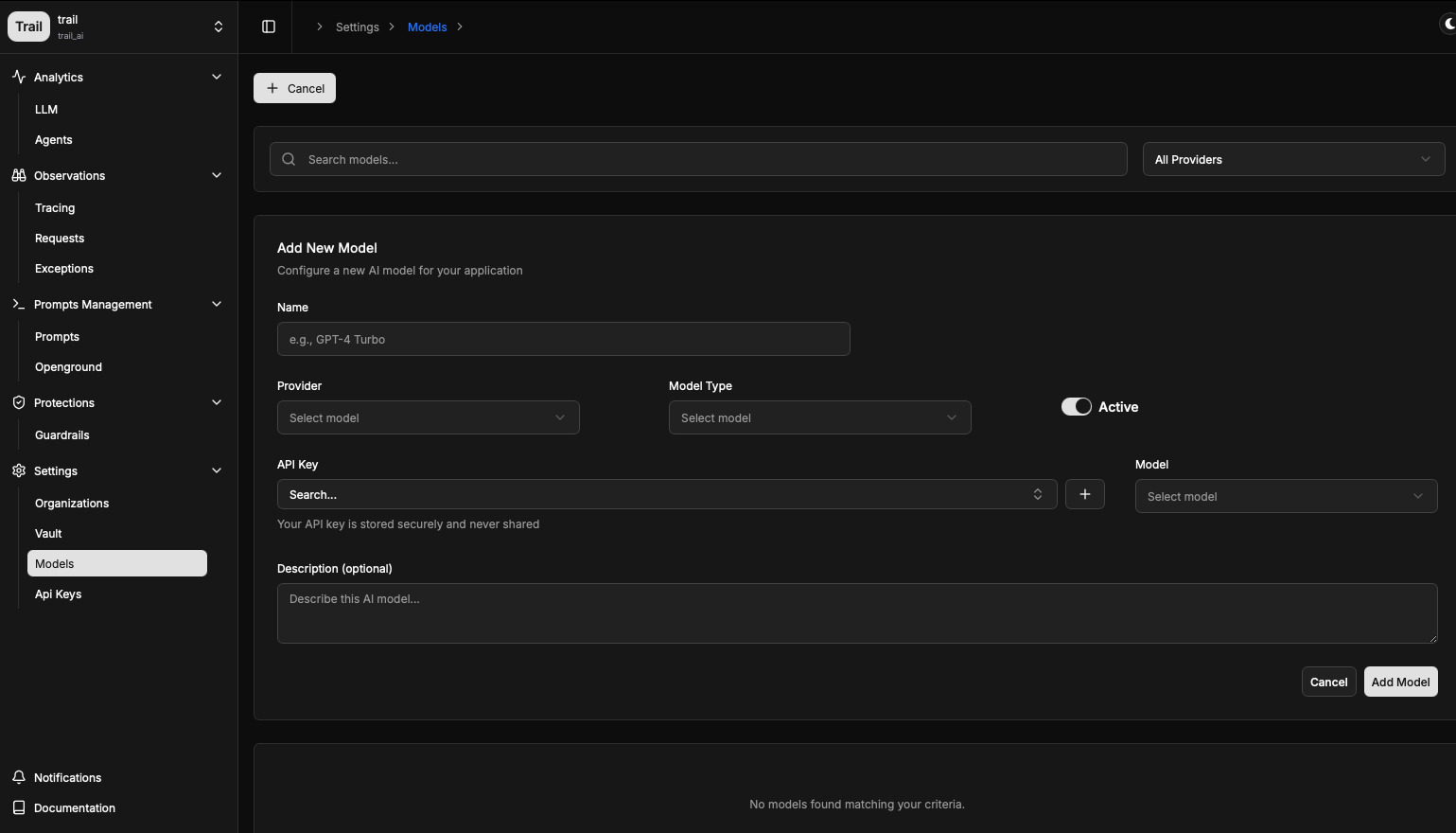
| Field | Required | Notes |
|---|---|---|
| Name | ✅ | A friendly label, e.g. GPT-4 Turbo. This is what appears in pickers |
| Provider | ✅ | OpenAI, Anthropic, Cohere, Mistral, Gemini, Grok, LLaMA, DeepSeek |
| Model Type | ✅ | Chat, embedding, image, audio — determines where the model is offered |
| API Key | ✅ | A Vault secret. Searchable; select by name |
| Model | ✅ | The provider's model identifier, e.g. gpt-4o-mini |
| Active | — | Inactive models stay registered but aren't offered for use |
| Description | ❌ | Free text — a good place to note "cheap default" or "high-accuracy only" |
The API Key field
This binds the model to a vault secret by reference, not by value. Rotate the credential in the vault and every model bound to it picks up the new value — no edits here.
Add the provider key to the Vault before registering models for that provider, or the selector will have nothing to offer.
Managing models
| Action | Effect |
|---|---|
| Search | Filter by name |
| Filter by status | Show active or inactive |
| Filter by provider | Narrow to one provider |
| Edit | Update any field. Changes apply to subsequent use |
| Toggle Active | Retire a model without deleting its configuration |
| Delete | Remove entirely |
Prefer deactivating over deleting. Deactivating keeps the record and its description, and is instantly reversible. Deleting a model that a guardrail depends on will break that guardrail's detection.
Recommended registrations
For a typical setup:
| Purpose | Model | Why |
|---|---|---|
| Guardrail judge | A fast, cheap chat model | Runs on every guarded request — latency and cost compound |
| Primary comparison | The model your app actually uses | So OpenGround compares against reality |
| Comparison candidates | Two or three alternatives | Give yourself something to compare against |
| Embedding | Whatever your RAG pipeline uses | For embedding-related features |
Choose the guardrail judge carefully. It runs on every input you guard. A large frontier model adds meaningful latency and cost to every request; a small fast model is almost always the right choice for classification work.
Troubleshooting
| Symptom | Cause | Fix |
|---|---|---|
| Model doesn't appear in OpenGround | Inactive, or wrong model type | Toggle Active; check the type matches |
| Authentication errors when using it | Vault credential is wrong or expired | Update the value in the Vault; the binding follows automatically |
| LLM-based guardrails return nothing useful | No active judge model registered | Register a chat model and confirm its key works in OpenGround |
Cost shows as 0 in analytics |
Unrelated to this page — the model is missing from the SDK's pricing table | See Configuration → Custom pricing |
Related
- Vault — where the credentials live
- OpenGround — the main consumer of registered models
- Guardrails — LLM-based detection needs a judge model